
7️⃣ Your 2FA app is great — but not if someone steals your phone
Making Cyber Security Simple tip 7️⃣

7️⃣ Protect your authenticator apps on your phone with biometrics
A lot of people use 2 Factor authentication (2FA) and that’s good. Everyone should be using 2FA on every online account that supports it, because usernames and passwords are no longer provide sufficient protection.
Methods of receiving the second factor
The second factor can take several forms. The most popular are either receiving a code by text message, or having an authenticator app on your phone generate the codes.
The text method way isn’t great for three reasons:
➡️ If you have no mobile phone coverage you can’t receive the code via text, so it is reliant on being in an area with a phone signal.
➡️ Text messaging is vulnerable to “SIM Swapping fraud”, a method used by hackers to gain access to your 2FA text messages
➡️ If someone steals your phone, even if it’s locked they can often still read the 2FA codes in the text message preview notifications that popup on the lock screen.
Authenticator apps are the much safer way, BUT
So there are big advantages to using authenticator apps such as Google Authenticator or Microsoft Authenticator.
But there is a vital security step that often gets missed.
By default the authenticator apps open and display the rotating six digit codes straight away. So if a criminal swipes your unlocked mobile out your hand in a busy street, they can gain access to your 2FA codes in the app.
Turn on Biometric checks within the app
There is a solution to this. Turn on biometrics within the authenticator app.
On Google Authenticator its in the settings, accessed via the apps hamburger menu on the top left of the screen. The option you need to turn on is “privacy screen”, and also select “Require Authentication Immediately”.

Now every time you open the Google Authenticator app it will require either a fingerprint or face recognition before it will display the 2FA codes.
On Microsoft Authenticator the setting is within the hamburger menu (also top left), and the option you need to turn on is called “App Lock”.
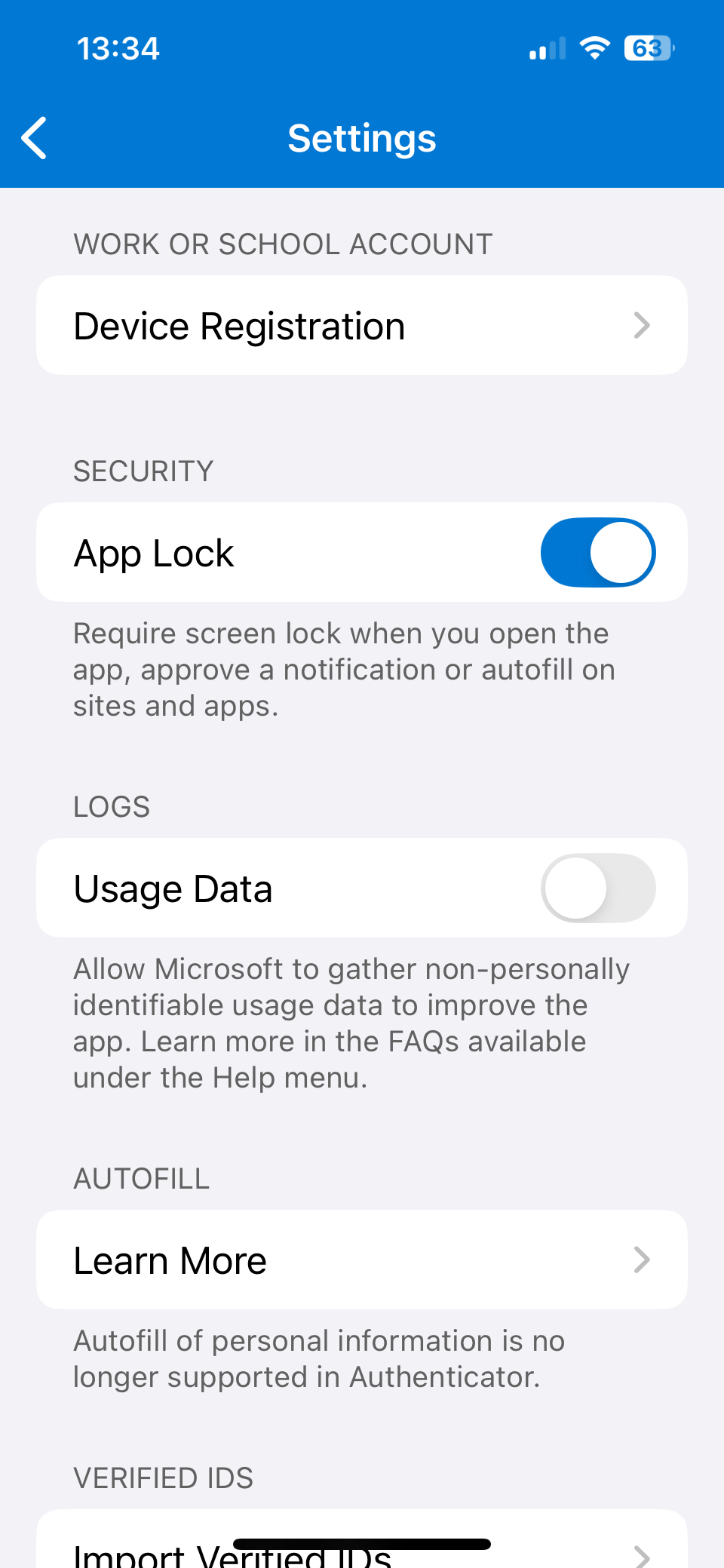
Now your 2FA setup is safe
With these additional app biometrics enabled your 2FA codes are still safe even if a criminal steals your phone, either with the screen locked or unlocked.
Chris
#TheAntiVirusGuy and
#TheDataBackupGuy and
#ThePasswordGuy
—
A bit about me:
💻 Helping Entrepreneurs, the Self Employed, Sole Traders and Small Business Owners manage their online passwords and keep their computers virus free.
💻 Really good anti virus (SentinelOne £16 or ESET £4 £8 £10 per month)
💻 Bitwarden Password Manager (Business Enterprise £6 per month, £66 per year, or for personal use Bitwarden Free)
Thanks for the restack @Raghav Mehra